 The Vibe Father
Hands-on Kimi K3 test
I asked Kimi K3 to build a Minecraft-style voxel sandbox in the browser. The result is astonishing. It generated a playable world with procedural terrain, responsive mining and building, animals, water, caves, inventory controls, flight, and a full day-night cycle.
This is not a mockup or a pretty screenshot. I can walk through the world, break sand and wood into particles, place blocks, swim, climb, fly, switch materials from the hotbar, and watch the lighting move from day into night. The game is live, so you can play the Kimi-built voxel sandbox for yourself.
Watch the Kimi K3 Minecraft clone in action
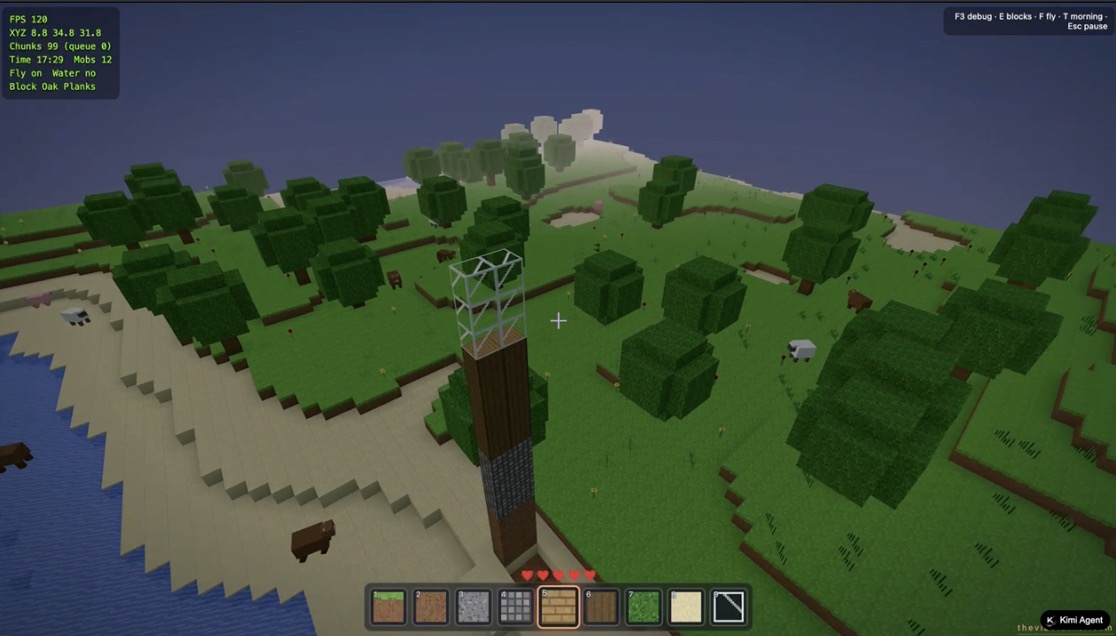
The recording below is my direct hands-on run. It shows block breaking, material placement, a tall improvised build, swimming, aerial movement, animals, and the changing sky. You can also see the hotbar, hearts, crosshair, and debug data updating as the world runs.
This is a working game, not a mockup
A screenshot can hide almost anything. Interaction cannot. The impressive part of this build is how many moving pieces work together while I am actually playing.
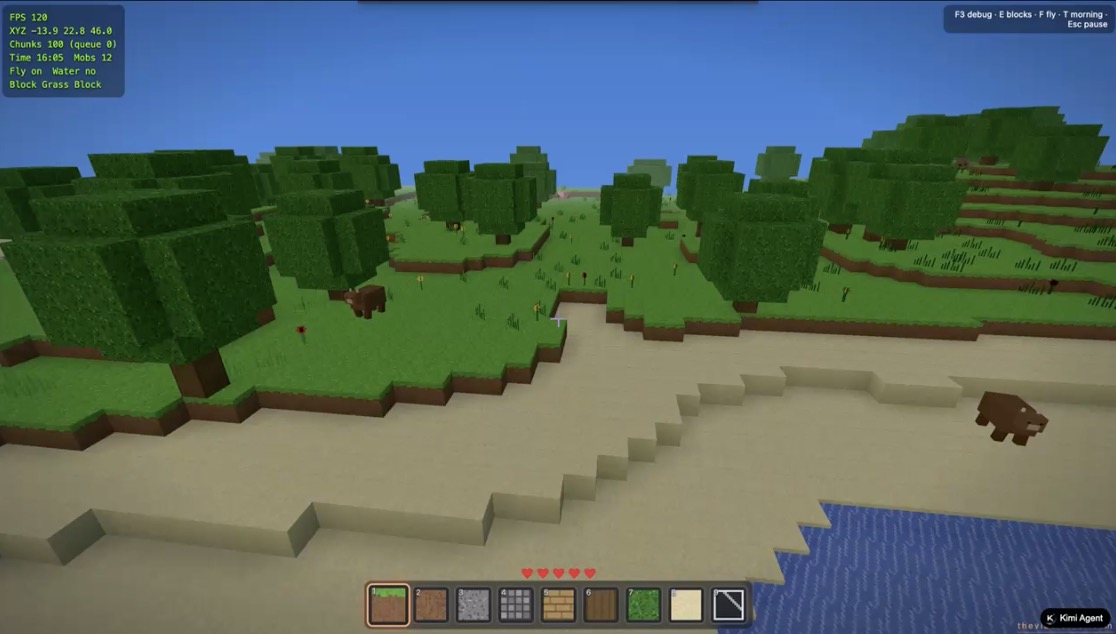
- Procedural terrain generates forests, beaches, oceans, elevation changes, caves, and underground ore.
- Chunked world rendering keeps the nearby environment active as the player moves through the map.
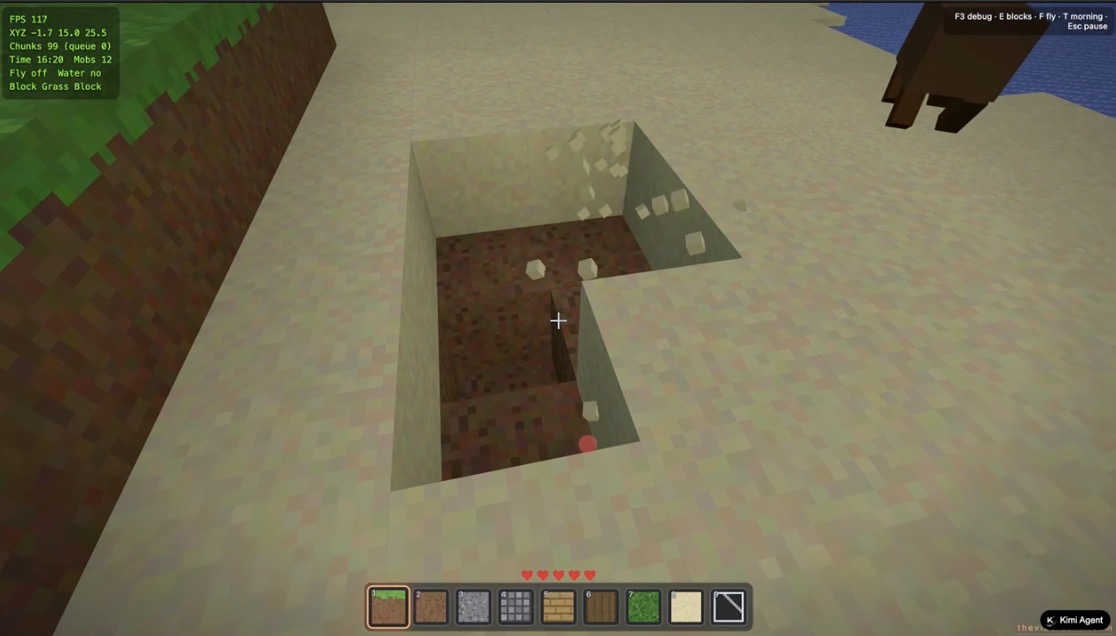
- Mining and placement let me remove terrain and build with several materials through the hotbar.
- Animals and enemies add cows, pigs, sheep, chickens, and night-time zombies to the world.
- Movement systems include walking, sprinting, jumping, swimming, and a toggleable flight mode.
- World simulation includes water, a ten-minute day-night loop, changing light, and zombies that burn after sunrise.
- Game feedback includes hearts, a crosshair, particles, inventory controls, synthesized sound, and a live debug overlay.
- Desktop and touch input make the same browser build usable beyond a keyboard and mouse setup.
The systems stay connected while you play
Block breaking is a good example. Clicking a sand block does not merely swap one texture. The targeted block reacts, particles burst outward, the terrain changes, and the opening remains available for more digging. Placing material then changes the same world in the opposite direction. That feedback loop is the foundation of a voxel sandbox.
The terrain also has enough variation to make exploration readable. Forested hills roll toward a beach. Water meets stepped sand. Animals move through the scene. Underground generation includes caves and ore rather than a flat decorative shell. Kimi also added a debug layer that reports frame rate, player coordinates, active chunks, time, nearby mobs, flight state, water state, and the selected block.
The performance is equally surprising
During this recording the debug overlay generally stayed around 97 to 123 frames per second while roughly 99 to 100 chunks and 12 mobs were reported. That is an observation from one browser session on one machine, not a controlled performance benchmark. It still matters because the build remained responsive while terrain, animals, particles, water, lighting, and player edits were active at the same time.
Kimi appears to have made sensible prototype tradeoffs. The world uses a 16 by 16 chunk footprint, a 64-block world height, a nearby mesh radius, and procedural noise for terrain and cave formation. Those choices keep the demo broad enough to feel alive without pretending it is a production-scale game engine.
Why this helps explain Kimi K3 at tentative number one
Kimi K3 currently holds tentative rank one in our coding benchmark with a Vibe Coding Index of 67.3. Its 83.9 Coding score is the strongest among the three leading models. Arena also places Kimi K3 at the top of its WebDev leaderboard, although Arena still labels that result Preliminary.
This project makes that placement easier to understand. Strong web development is not just writing a component that looks close to a reference. This demo demands scene rendering, procedural generation, collision, input state, game loops, particles, sound, responsive controls, and enough visual judgment to make the whole thing coherent. Kimi did not merely make each feature exist. It made the features cooperate.
That said, this demo is qualitative evidence. It is not a scored benchmark and it does not change our index by itself. The tentative score and rank use a provisional multi-source composite anchored by the independent Artificial Analysis profile, the broader launch suite, and Arena WebDev. A hands-on build like this adds the part a leaderboard cannot show, which is what the model feels like when asked to turn an ambitious idea into something usable.
What still needs work
This is a browser prototype, not a finished Minecraft replacement. I did not verify persistent saves, a server-backed world, multiplayer, or a complete crafting and progression system. A production game would also need deeper code review, cross-device testing, accessibility work, memory profiling, longer play sessions, and far more content.
Those limits do not weaken the result. They define it honestly. Kimi K3 built an unusually complete interactive prototype that is fun to explore and technically broad enough to expose weak coding models. Most AI-generated game demos fall apart the moment you touch them. This one invites you to keep playing.
Try the result yourself
Open the live Kimi K3 Minecraft-style game, click to enter the world, and test it beyond the screenshots. Use WASD to move, the mouse to look, left click to break blocks, right click to place them, F to fly, E for inventory, and F3 for the debug view.
This is an independent Minecraft-style demonstration and is not affiliated with Mojang or Microsoft.

